Evil Genius Labs
Purveyor of finely hand-crafted pixels. ꩜
Purveyor of finely hand-crafted pixels. ꩜
Fibonacci256 Puck is a beautiful, motion-sensitive 75mm circular disc with 256 RGB LEDs surface mounted in a Fibonacci distribution. Swirling and pulsing like a colorful galaxy, it’s mesmerizing to watch.
It consists of 256 RGB LEDs, arranged into a circular Fermat’s spiral pattern.
In disc phyllotaxis, as in the sunflower and daisy, the mesh of spirals occurs in Fibonacci numbers because divergence (angle of succession in a single spiral arrangement) approaches the golden ratio. The shape of the spirals depends on the growth of the elements generated sequentially. In mature-disc phyllotaxis, when all the elements are the same size, the shape of the spirals is that of Fermat spirals—ideally. That is because Fermat's spiral traverses equal annuli in equal turns. The full model proposed by H Vogel in 1979[2] is


where θ is the angle, r is the radius or distance from the center, and n is the index number of the floret and c is a constant scaling factor. The angle 137.508° is the golden angle which is approximated by ratios of Fibonacci numbers.[3]
Fermat's spiral. (2015, October 24). In Wikipedia, The Free Encyclopedia. Retrieved 02:45, February 24, 2016, from https://en.wikipedia.org/w/index.php?title=Fermat%27s_spiral
Your Fibonacci Puck has a Pixelblaze Pico inside. The Pixelblaze has a push button and status LED on it. The button can be clicked once to move to the next pattern, enter setup mode, etc.
To press the button, place your thumb on the center of the front display and your middle finger on the back of the puck. Quickly squeeze and release the puck to press the button. You may not hear a “click”, but you’ll know it’s worked if it moves to the next pattern.
The button can also be used to enter setup mode, enable WiFi if it’s been disabled in the Settings, etc. Look into the opening where the power switch is, then squeeze and hold. After a few seconds you should see the orange status light inside.
Your Fibonacci should automatically play a playlist of pre-selected patterns endlessly.
For more control, you can connect to it via wi-fi.
To connect your Fibonacci to a wi-fi network:
If not already connected to a wi-fi network, your Fibonacci will create its own network named Pixelblaze_XXXXXXX, where XXXXX is a code unique to your Fibonacci. You should see it in the list of wi-fi networks available on a computer or mobile device:
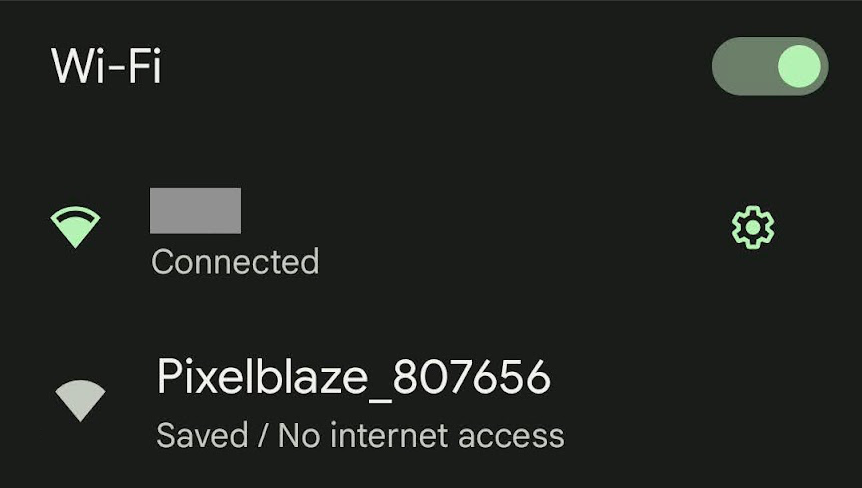
Note: If you can’t find the Fibonacci’s wi-fi network, it may not be in setup mode.
To put it in to setup mode:
You should see a pop-up and/or automatically get redirected to configure the Fibonacci’s wi-fi settings. If not, open a browser and go to http://192.168.4.1
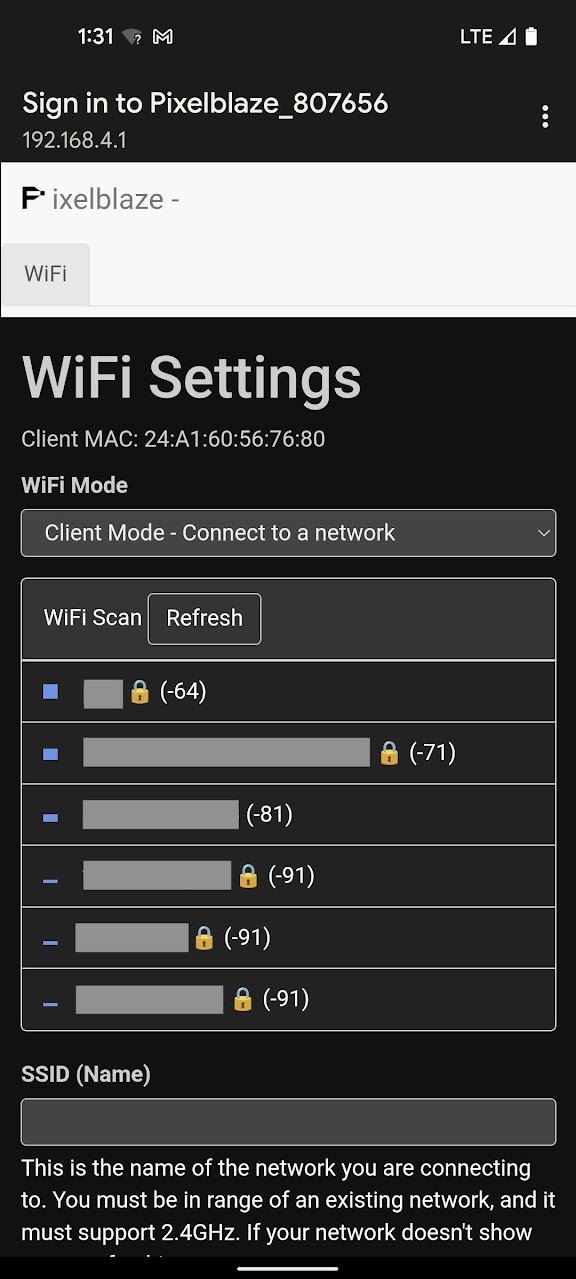
In WiFi Settings you an configure your Fibonacci to run in one of two modes:
Client Mode - Connect to a network
In this mode your Fibonacci can connect to an existing wi-fi network. Use this mode while at home or another location with an existing wi-fi network that you can connect to.
Choose the wi-fi network to which you’d like to connect, or enter the SSID (Name) if you know it, it’s hidden, etc.
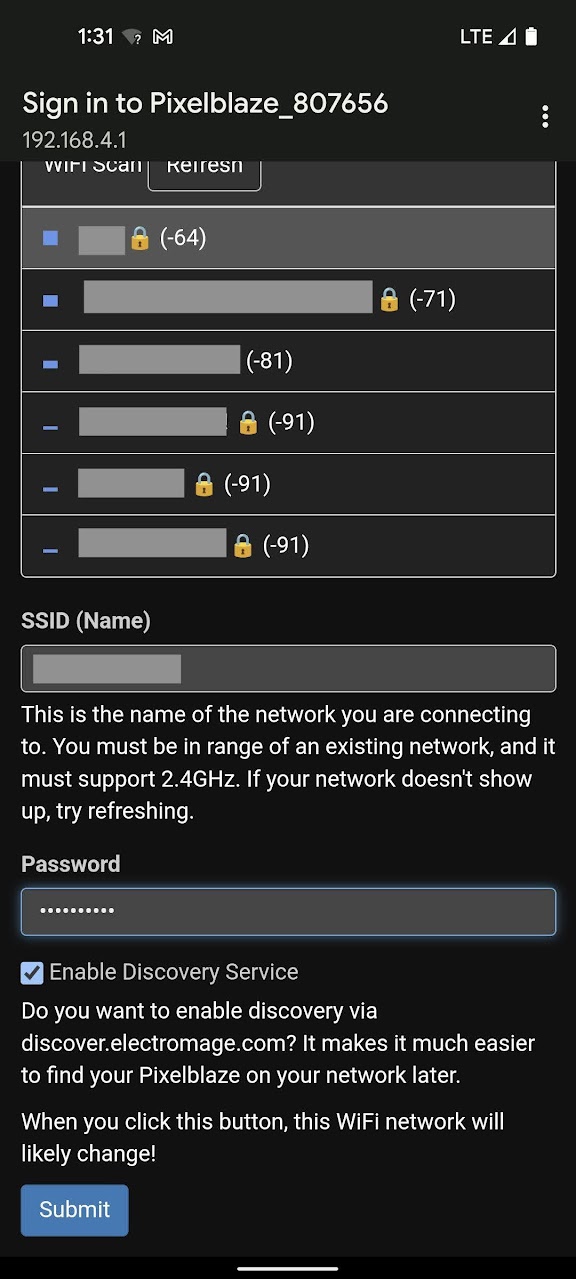
Click Submit to connect.
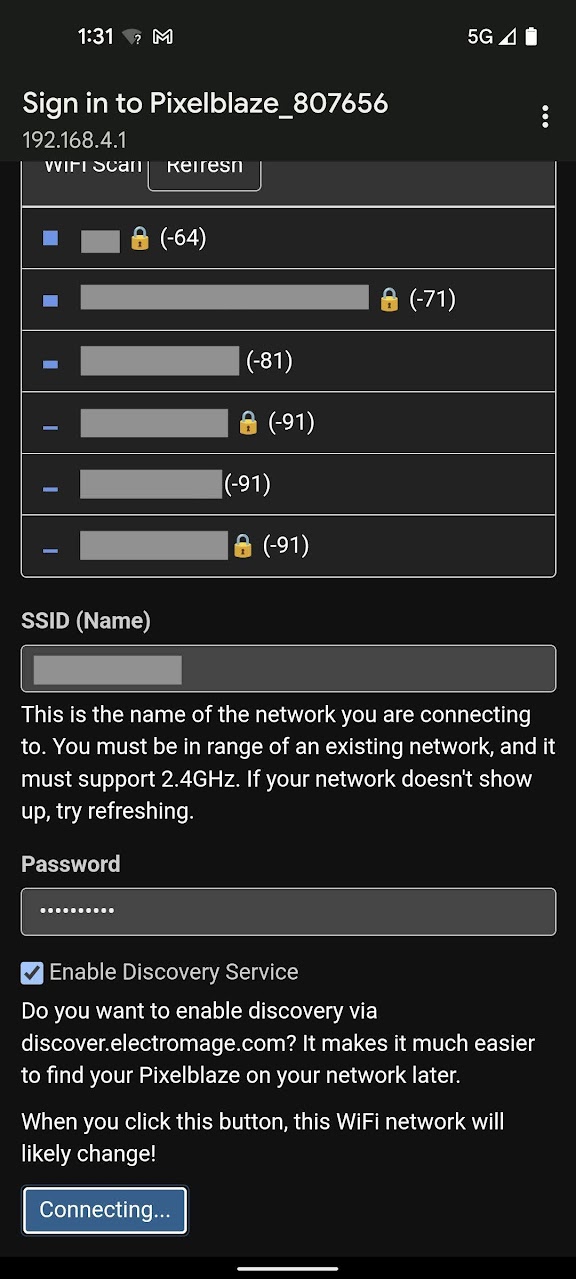
AP Mode - Create a stand-alone network
In this mode your Fibonacci will create its own wi-fi network that you can connect to from another device. Use this mode when outdoors or away from other wi-fi networks.
If you’ve already chosen Client Mode and followed the instructions above, skip down to Next Steps
After you’ve gotten your Fibonacci connected to a wi-fi network, there are a few settings you should check and be aware of.
Open your Fibonacci’s web app and click on the Settings tab.
We won’t go over every setting on this page, just the ones that are important for the use of your Fibonacci.
These settings should always be set to the following values to match the type and quantity of LEDs in your Fibonacci256:
To increase battery life Power saving > CPU speed is set to 160MHz. To further increase battery life, you can set it to 80MHz but some patterns will run at a much lower framerate and may appear “choppy”.
You can increase battery life further by checking Disable WiFi on startup, but this does make the device hard to reach again. With this option checked, to bring WiFi back for one session, look into the opening where the power switch is, and squeeze and hold the puck for five seconds. You should see the orange status LED inside flash twice.
You shouldn’t need to change anything on the Mapper tab. This page just contains the pixel map, which is the location of each of your Fibonacci’s LEDs. It’s used by the Pixelblaze controller in patterns.
If you ever do need to reset to the Fibonacci’s default map, use these values:
[[36.01,37.6],[27.45,36.24],[23.72,33.81],[21.41,30.75],[20.15,27.28],[19.81,23.57],[20.35,19.79],[21.71,16.06],[23.84,12.52],[26.68,9.3],[30.18,6.5],[34.24,4.25],[38.76,2.61],[46.02,4.57],[41.36,5.26],[37.04,6.65],[33.17,8.67],[29.86,11.23],[27.19,14.25],[25.26,17.62],[24.15,21.2],[23.96,24.89],[24.81,28.54],[26.98,32.04],[31.54,35.4],[30.73,31.84],[28.51,27.61],[28.01,23.72],[28.69,20.08],[30.3,16.75],[32.7,13.81],[35.78,11.36],[39.42,9.49],[43.5,8.27],[47.9,7.76],[52.49,7.99],[57.16,9.01],[66.23,17.14],[62.17,14.51],[57.89,12.64],[53.54,11.54],[49.22,11.21],[45.09,11.64],[41.28,12.81],[37.91,14.66],[35.12,17.14],[33.08,20.21],[31.97,23.84],[32.15,28.14],[35.06,34.33],[35.33,30.47],[35.44,25.22],[36.98,21.5],[39.42,18.68],[42.5,16.64],[46.05,15.39],[49.92,14.91],[53.96,15.23],[58.03,16.33],[62,18.2],[65.74,20.82],[69.12,24.13],[72.39,35.74],[70.36,31.39],[67.76,27.57],[64.67,24.35],[61.22,21.82],[57.51,20.04],[53.68,19.04],[49.88,18.87],[46.23,19.56],[42.9,21.17],[40.08,23.81],[38.02,27.88],[39.03,32.18],[42.03,26.94],[45.33,24.37],[48.89,23.14],[52.57,22.96],[56.24,23.72],[59.76,25.32],[63,27.68],[65.85,30.73],[68.21,34.39],[69.97,38.55],[71.07,43.11],[67.64,54.55],[68.23,49.83],[68.06,45.24],[67.15,40.93],[65.56,36.99],[63.37,33.56],[60.65,30.73],[57.51,28.63],[54.04,27.35],[50.34,27.05],[46.48,27.97],[42.39,30.74],[39.56,35.78],[46.15,31.63],[50.5,30.97],[54.25,31.7],[57.51,33.42],[60.25,35.95],[62.4,39.11],[63.91,42.79],[64.72,46.85],[64.79,51.16],[64.09,55.58],[62.61,59.99],[60.37,64.26],[53.68,67.73],[56.67,64.07],[58.92,60.13],[60.42,56.02],[61.14,51.88],[61.08,47.85],[60.24,44.05],[58.65,40.65],[56.33,37.79],[53.26,35.65],[49.34,34.5],[43.85,35.01],[46.78,37.22],[51.18,38.86],[54.13,41.41],[56.07,44.56],[57.12,48.12],[57.31,51.92],[56.68,55.81],[55.25,59.65],[53.05,63.31],[50.14,66.66],[46.58,69.59],[42.45,71.99],[35.02,71.32],[39.45,69.81],[43.42,67.69],[46.83,65.02],[49.6,61.91],[51.64,58.47],[52.89,54.83],[53.29,51.11],[52.75,47.47],[51.15,44.04],[48.17,40.98],[42.17,38.42],[44.31,41.51],[47.65,45.41],[48.99,49.19],[49.07,52.91],[48.15,56.48],[46.36,59.81],[43.81,62.77],[40.61,65.26],[36.85,67.19],[32.65,68.49],[28.12,69.08],[23.38,68.92],[13.1,62.55],[17.54,64.39],[22.05,65.46],[26.5,65.75],[30.77,65.29],[34.72,64.12],[38.23,62.27],[41.17,59.83],[43.41,56.87],[44.8,53.45],[45.13,49.61],[43.96,45.26],[40.35,42.96],[41.55,48.67],[40.82,52.76],[39.01,56.05],[36.39,58.64],[33.16,60.55],[29.48,61.74],[25.48,62.17],[21.31,61.84],[17.1,60.73],[12.98,58.84],[9.09,56.21],[3.88,45.44],[6.63,49.33],[9.86,52.6],[13.45,55.18],[17.28,57.02],[21.22,58.09],[25.14,58.35],[28.89,57.79],[32.32,56.4],[35.26,54.15],[37.51,50.91],[38.68,46.2],[37.27,41.07],[35.23,48.02],[32.46,51.38],[29.2,53.35],[25.62,54.25],[21.9,54.22],[18.16,53.32],[14.56,51.62],[11.23,49.16],[8.27,46.02],[5.8,42.27],[3.91,38.01],[2.68,33.34],[5.27,26.25],[5.54,30.97],[6.53,35.41],[8.19,39.46],[10.46,43.01],[13.22,45.96],[16.4,48.21],[19.87,49.66],[23.52,50.22],[27.22,49.76],[30.88,48],[34.54,44.07],[30.85,44.29],[26.54,45.97],[22.66,46.05],[19.11,45.01],[15.95,43.08],[13.25,40.39],[11.09,37.09],[9.56,33.28],[8.71,29.09],[8.6,24.64],[9.26,20.07],[10.69,15.5],[16.63,10.97],[14.37,15.07],[12.87,19.33],[12.15,23.6],[12.2,27.77],[13.01,31.7],[14.53,35.24],[16.74,38.26],[19.58,40.6],[23.06,42.08],[27.27,42.36],[33.21,40.38],[29.66,39.34],[24.67,38.67],[21.18,36.76],[18.63,34.06],[16.91,30.79],[16,27.12],[15.89,23.21],[16.58,19.2],[18.06,15.23],[20.3,11.44],[23.25,7.94],[26.86,4.86]]
Fibonacci comes with a wide variety of patterns built-in. By default, it will automatically play a playlist of pre-selected patterns.
The sequencer can be configured via the web interface over wi-fi in the following ways:
Pattern sequencer options:
You can download this backup file Fibonacci256 Puck.pbb and restore it with the Restore from backup button at the bottom of the PixelBlaze web UI’s Settings tab/page.
#define NUM_LEDS 256

byte coordsX[NUM_LEDS] = { 133, 164, 178, 186, 191, 192, 190, 185, 178, 167, 154, 140, 123, 96, 114, 129, 143, 156, 165, 172, 176, 177, 174, 166, 149, 152, 161, 162, 160, 154, 145, 134, 121, 106, 90, 73, 56, 23, 37, 53, 69, 85, 100, 114, 126, 136, 144, 148, 147, 137, 136, 135, 130, 121, 109, 96, 82, 67, 53, 38, 24, 12, 0, 7, 17, 28, 41, 54, 68, 82, 96, 108, 118, 126, 122, 111, 99, 86, 73, 59, 46, 34, 24, 15, 9, 5, 17, 15, 16, 19, 25, 33, 43, 54, 67, 81, 95, 110, 120, 96, 80, 66, 54, 44, 37, 31, 28, 28, 30, 36, 44, 68, 58, 49, 44, 41, 41, 44, 50, 59, 70, 84, 104, 94, 78, 67, 60, 56, 55, 57, 63, 71, 81, 94, 110, 137, 120, 106, 93, 83, 76, 71, 70, 72, 78, 89, 111, 103, 90, 86, 85, 89, 95, 105, 116, 130, 145, 162, 179, 217, 201, 184, 168, 152, 138, 125, 114, 106, 101, 100, 104, 117, 113, 115, 122, 132, 144, 157, 172, 187, 202, 217, 232, 251, 241, 229, 216, 202, 187, 173, 159, 147, 136, 128, 123, 128, 136, 146, 158, 171, 185, 198, 212, 224, 235, 244, 251, 255, 246, 245, 241, 235, 227, 216, 205, 192, 179, 165, 152, 138, 152, 168, 182, 195, 206, 216, 224, 230, 233, 233, 231, 226, 204, 212, 218, 220, 220, 217, 212, 204, 193, 180, 165, 143, 156, 175, 187, 197, 203, 206, 207, 204, 199, 191, 180, 167 };
byte coordsY[NUM_LEDS] = { 129, 124, 115, 103, 91, 77, 63, 49, 36, 25, 14, 6, 0, 7, 10, 15, 22, 32, 43, 55, 68, 82, 95, 108, 121, 107, 92, 78, 64, 52, 41, 32, 25, 21, 19, 20, 24, 53, 44, 37, 33, 32, 33, 37, 44, 53, 65, 78, 94, 117, 102, 83, 69, 59, 52, 47, 45, 46, 50, 57, 67, 79, 122, 106, 92, 80, 71, 64, 60, 60, 62, 68, 78, 93, 109, 89, 80, 75, 75, 78, 83, 92, 103, 117, 132, 149, 191, 174, 157, 141, 126, 114, 103, 96, 91, 90, 93, 103, 122, 107, 104, 107, 113, 123, 134, 148, 163, 178, 195, 211, 227, 239, 226, 211, 196, 181, 166, 152, 140, 129, 121, 117, 119, 127, 133, 143, 154, 167, 181, 196, 210, 223, 235, 246, 255, 253, 247, 239, 229, 218, 205, 192, 178, 165, 152, 141, 132, 143, 157, 171, 185, 198, 210, 221, 230, 237, 242, 244, 244, 220, 227, 231, 232, 230, 226, 219, 210, 199, 187, 173, 157, 148, 169, 184, 196, 206, 213, 217, 219, 218, 214, 207, 197, 157, 172, 184, 193, 200, 204, 205, 203, 198, 189, 178, 160, 141, 167, 179, 186, 190, 190, 186, 180, 171, 160, 146, 130, 113, 87, 104, 121, 135, 148, 159, 168, 173, 175, 173, 167, 152, 153, 159, 160, 156, 149, 139, 127, 113, 97, 81, 64, 47, 31, 46, 61, 77, 92, 107, 120, 131, 140, 145, 146, 139, 135, 133, 126, 116, 104, 90, 76, 61, 46, 32, 20, 8 };
byte angles[NUM_LEDS] = { 151, 131, 124, 118, 112, 106, 100, 94, 89, 83, 77, 71, 65, 56, 62, 68, 74, 80, 86, 92, 98, 104, 110, 118, 129, 113, 103, 96, 89, 83, 77, 70, 64, 58, 52, 46, 40, 24, 30, 36, 42, 48, 55, 61, 67, 74, 81, 88, 97, 120, 94, 80, 72, 64, 58, 51, 45, 39, 32, 26, 20, 15, 254, 5, 11, 17, 23, 29, 35, 41, 48, 55, 62, 73, 73, 53, 44, 37, 31, 25, 19, 13, 7, 1, 251, 245, 230, 236, 241, 247, 252, 3, 9, 14, 20, 27, 33, 42, 181, 21, 15, 10, 4, 253, 248, 243, 237, 232, 227, 222, 216, 208, 213, 218, 223, 228, 233, 238, 244, 249, 254, 3, 2, 244, 242, 238, 234, 229, 224, 219, 214, 209, 204, 199, 194, 186, 191, 196, 201, 206, 210, 215, 220, 224, 228, 231, 218, 217, 218, 215, 211, 207, 202, 197, 192, 188, 183, 178, 173, 160, 165, 170, 175, 180, 184, 189, 194, 198, 202, 206, 207, 195, 197, 194, 190, 186, 181, 176, 172, 167, 162, 157, 152, 139, 144, 149, 154, 159, 164, 168, 173, 178, 182, 186, 187, 175, 178, 174, 170, 165, 161, 156, 151, 146, 141, 136, 131, 125, 117, 123, 128, 133, 138, 143, 148, 153, 158, 162, 167, 170, 160, 155, 151, 146, 141, 135, 130, 125, 120, 114, 109, 103, 95, 100, 106, 111, 117, 122, 128, 133, 138, 143, 149, 155, 143, 137, 131, 125, 120, 114, 109, 103, 97, 92, 86, 80 };
byte radii[NUM_LEDS] = { 30, 82, 107, 126, 141, 154, 165, 176, 185, 194, 202, 210, 218, 209, 200, 192, 182, 173, 163, 152, 140, 126, 109, 88, 55, 64, 90, 109, 125, 138, 150, 161, 172, 182, 191, 201, 210, 214, 204, 193, 183, 172, 161, 150, 138, 124, 109, 92, 69, 32, 43, 72, 93, 110, 125, 139, 152, 164, 176, 187, 199, 210, 218, 206, 194, 182, 169, 156, 143, 128, 113, 96, 76, 50, 21, 57, 81, 101, 119, 134, 149, 163, 177, 190, 203, 216, 227, 214, 201, 187, 173, 158, 143, 127, 109, 89, 66, 35, 4, 49, 77, 100, 119, 137, 154, 169, 184, 199, 212, 225, 238, 237, 224, 210, 196, 181, 166, 149, 132, 112, 91, 64, 28, 49, 80, 105, 126, 145, 162, 178, 194, 208, 221, 234, 247, 243, 231, 219, 205, 190, 175, 158, 140, 120, 97, 68, 27, 52, 86, 112, 134, 153, 170, 186, 201, 215, 227, 239, 250, 255, 245, 234, 222, 210, 196, 181, 165, 147, 127, 103, 73, 52, 91, 118, 139, 158, 175, 190, 204, 216, 228, 238, 248, 249, 240, 231, 221, 209, 197, 183, 167, 150, 130, 106, 74, 43, 91, 119, 140, 158, 174, 188, 201, 212, 222, 231, 240, 248, 238, 230, 222, 213, 202, 191, 178, 164, 148, 128, 104, 69, 85, 114, 135, 152, 167, 180, 192, 202, 211, 219, 227, 234, 224, 216, 208, 200, 190, 180, 168, 155, 139, 120, 96, 56, 73, 103, 124, 141, 155, 167, 178, 188, 197, 205, 213, 220 };